
November 2025 – SystmOne Newsletter
Topics
A message from our team
Hello!
Welcome back to this month’s PCIT newsletter, it has been another busy month following attendance at the New Practice Manager Conference over in South Normanton and supporting practices in person with utilising our tools. Read below for how we’ve updated our CQC Navigator and let us know if you’re wanting to support in testing our Social Prescribing Link Worker template!
Best Wishes,
James (Customer Experience Manager)
Welcome back to this month’s PCIT newsletter, it has been another busy month following attendance at the New Practice Manager Conference over in South Normanton and supporting practices in person with utilising our tools. Read below for how we’ve updated our CQC Navigator and let us know if you’re wanting to support in testing our Social Prescribing Link Worker template!
Best Wishes,
James (Customer Experience Manager)
PCIT Updates
📝 COPD Register Update
We previously shared information about a change to the COPD register, affecting all clinical systems, which unexpectedly brought additional patients onto the register due to having a code for COPD review on their medical record. The NHS clinical terminology team has now removed the codes meaning registers have returned to their usual size. Longstanding searches for recall or Local Enhanced Services relating to COPD should no longer identify additional patients without a COPD diagnosis.
🤝 New Practice Manager Conference
This month we attended the “New Practice Manager Conference” over in South Normanton. Vanessa, our Customer Service Manager, was there speaking with lots of new Practice Managers looking for new solutions to adopt with their practice.
It was great to speak to so many new people within the Practice Management space!
We look forward to speaking with more of you at future conferences in 2026!
It was great to speak to so many new people within the Practice Management space!
We look forward to speaking with more of you at future conferences in 2026!
🚨 IMPORTANT – Changes to the Childhood Vaccination Schedule from 1st January 2026
The next stage in the 2025/26 changes to the Childhood Vaccination Schedule takes effect on 1st January 2026. We would like to reassure customers that changes to resources are being finalised and will be deployed in December. The template changes will be deployed at the very end of December to avoid any risk of patients being vaccinated outside the current schedule. There is no need to submit tickets to support asking for these changes or whether PCIT is aware of them, all customers will be included in the deployment.
Watch this space for further updates during December!
Watch this space for further updates during December!
Resource Releases & Updates
💉 High Risk Drug Monitoring Templates
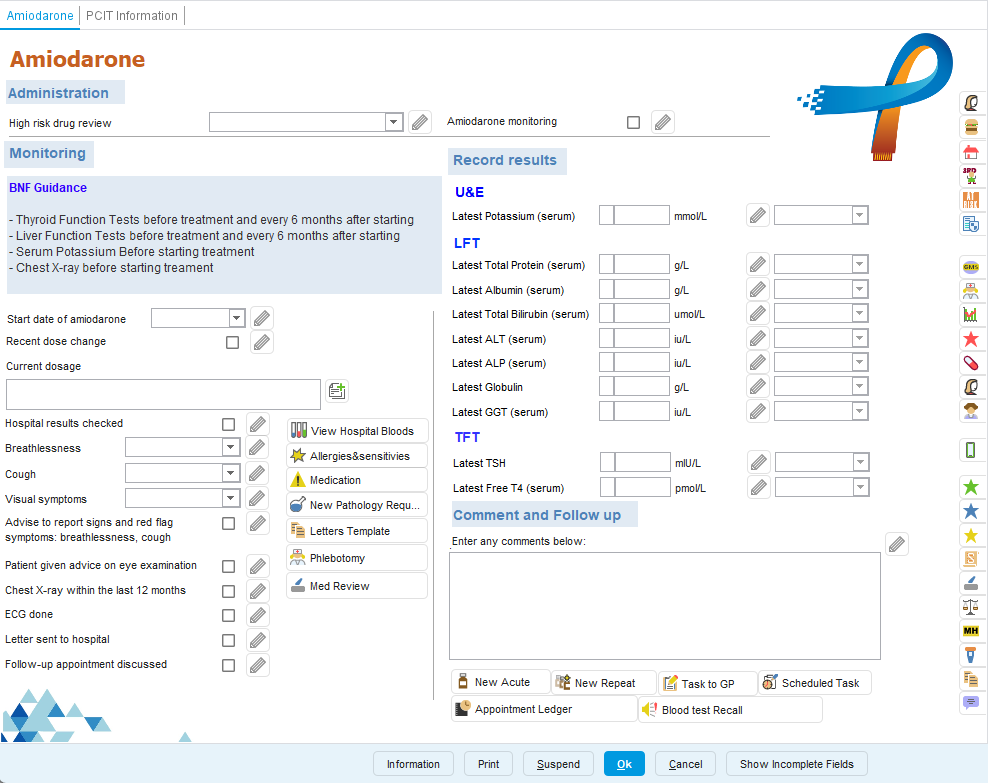
We have released a suite of High Risk Drug Monitoring templates. These templates have been designed to support safe and consistent monitoring for patients prescribed high risk medication that require regular review and blood test surveillance.
There are currently two main groups of high-risk drug monitoring templates available:
DMARD (Disease-Modifying Anti-Rheumatic Drugs) – e.g. methotrexate, sulfasalazine, hydroxychloroquine.
Non-DMARD High-Risk Drugs – e.g. amiodarone, lithium, warfarin and other medicines requiring close biochemical or clinical monitoring.
📚 For further details, please see our support guide below.
There are currently two main groups of high-risk drug monitoring templates available:
DMARD (Disease-Modifying Anti-Rheumatic Drugs) – e.g. methotrexate, sulfasalazine, hydroxychloroquine.
Non-DMARD High-Risk Drugs – e.g. amiodarone, lithium, warfarin and other medicines requiring close biochemical or clinical monitoring.
📚 For further details, please see our support guide below.
🔍 RSV Pregnancy Searches
RSV vaccinations are claimed via CQRS in the same way as many other vaccinations but often get missed due to coding.
Practices should check their data prior to extraction and maximise their income potential. Following a recently released set of Business rules for RSVP001 (Sept 2025), PCIT has built a collection of searches with a particular emphasis on checking coding (where the vaccination was given and searches where a pregnancy code might be missing or not entering in the correct timeframe).
📚 For further details, please see our support guide below.
Practices should check their data prior to extraction and maximise their income potential. Following a recently released set of Business rules for RSVP001 (Sept 2025), PCIT has built a collection of searches with a particular emphasis on checking coding (where the vaccination was given and searches where a pregnancy code might be missing or not entering in the correct timeframe).
📚 For further details, please see our support guide below.
🏆 032 CQC Navigator
New searches for DOAC and bisphosphonate monitoring, with changes reflecting the new requirements for bisphosphonate monitoring when prescribed for 5+ years, and DOAC monitoring frequency, following changes to NICE and CQC guidelines earlier in the year.
A selection of data quality improvements have been made to the reports too.
📚 For further details, please see our support guide below.
A selection of data quality improvements have been made to the reports too.
📚 For further details, please see our support guide below.
FAQs, Training & more
Wanting to use our searches?
We have a full suite of searches available for practice use. You can find your current searches readily installed in your system by going to Population Reporting & opening the “Primary Care IT” folder.
It’s important to note we go into practice systems and update these as frequently as possible. For further information on our searches, click here. See our guide to know the latest changes to our searches here.
Queries about CQC Navigator?
CQC inspection teams use a set of searches which have been designed to help them to understand how a Practice manages their patient population, and to identify clinical situations which should not be happening. To support with this,
Primary Care IT has adapted these searches to help practices understand what might need to be addressed before
a CQC inspector finds it.
We recommend checking our CQC Navigator FAQ guide here. If you have any questions after reading the article, please raise a ticket with us for support.
How do I raise a support ticket?
If you ever need to contact us for support, the best way to reach us is by creating a support ticket, you can do this here. These tickets are triaged internally and passed to the relevant member of our team to ensure your request or question is answered to the best of our ability. You can always chase the progress of your support tickets by calling our office (0333 344 3678) and providing your ticket reference number.
We have a full suite of searches available for practice use. You can find your current searches readily installed in your system by going to Population Reporting & opening the “Primary Care IT” folder.
It’s important to note we go into practice systems and update these as frequently as possible. For further information on our searches, click here. See our guide to know the latest changes to our searches here.
Queries about CQC Navigator?
CQC inspection teams use a set of searches which have been designed to help them to understand how a Practice manages their patient population, and to identify clinical situations which should not be happening. To support with this,
Primary Care IT has adapted these searches to help practices understand what might need to be addressed before
a CQC inspector finds it.
We recommend checking our CQC Navigator FAQ guide here. If you have any questions after reading the article, please raise a ticket with us for support.
How do I raise a support ticket?
If you ever need to contact us for support, the best way to reach us is by creating a support ticket, you can do this here. These tickets are triaged internally and passed to the relevant member of our team to ensure your request or question is answered to the best of our ability. You can always chase the progress of your support tickets by calling our office (0333 344 3678) and providing your ticket reference number.