
May 2026 – EMIS Newsletter
Topics
A message from our team
Hello!
Welcome to our May newsletter! It’s been a busy month at PCIT, and I’m excited to share details of our upcoming webinar, we’ll be covering updates to our resources in line with this year’s national contract (QOF) changes. You’ll find full details below. In addition to this, please see our below message regarding COVID claims on CQRS.
Best wishes,
James (Customer Experience Manager)
Welcome to our May newsletter! It’s been a busy month at PCIT, and I’m excited to share details of our upcoming webinar, we’ll be covering updates to our resources in line with this year’s national contract (QOF) changes. You’ll find full details below. In addition to this, please see our below message regarding COVID claims on CQRS.
Best wishes,
James (Customer Experience Manager)
PCIT Updates
🏟️ Digital Transformation Leads Conference
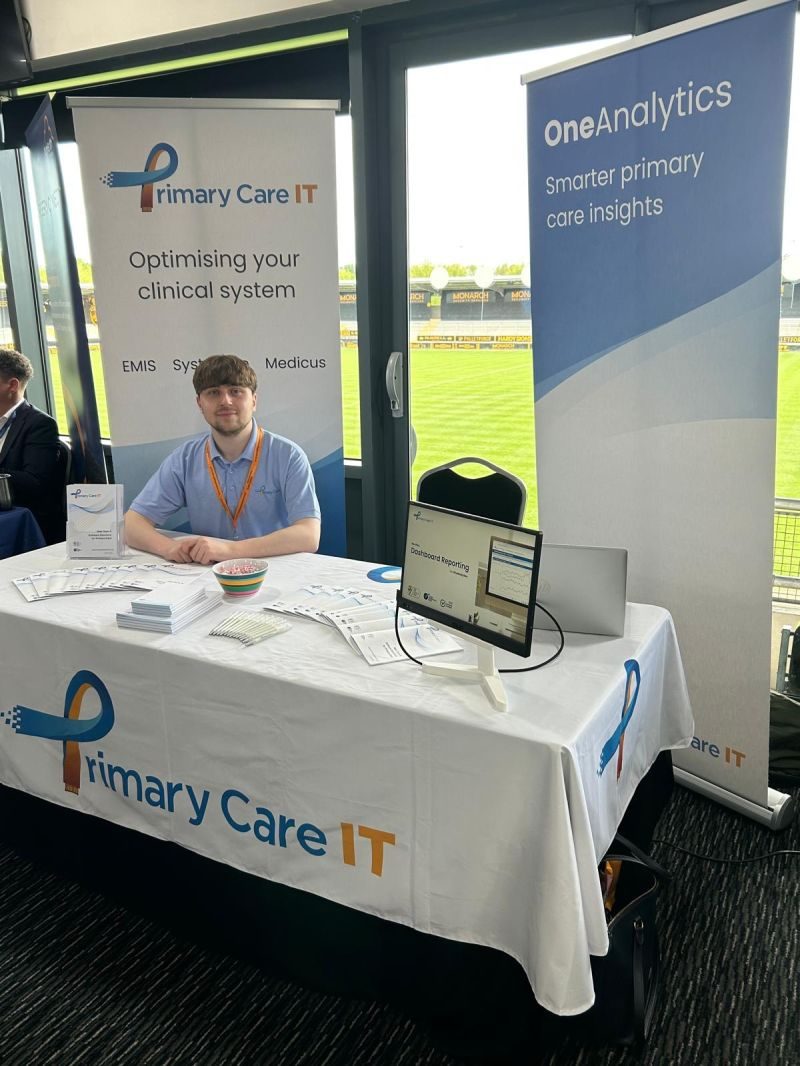
Last week we attended the Digital Transformation Leads Conference! Held at the Pirelli Stadium, Burton-Upon-Trent. Hosted by Howbeck Healthcare.
James & Vanessa from the team attended and spoke with both several DTLs & Practice Managers. We also held a break-out room discussion which highlighted the benefits of effective localisation.
Drawing on our experience supporting customers, we shared real-world case studies. These demonstrated how targeted changes to templates, workflows, and incorporation of intelligent alerts into clinical systems can support more proactive care and improve efficiency. By prompting users at the point of data entry, our alerts help ensure key requirements are met in real time, reducing the need for retrospective reconciliation, while also supporting improved performance and helping practices to secure the funding they are entitled to.
James & Vanessa from the team attended and spoke with both several DTLs & Practice Managers. We also held a break-out room discussion which highlighted the benefits of effective localisation.
Drawing on our experience supporting customers, we shared real-world case studies. These demonstrated how targeted changes to templates, workflows, and incorporation of intelligent alerts into clinical systems can support more proactive care and improve efficiency. By prompting users at the point of data entry, our alerts help ensure key requirements are met in real time, reducing the need for retrospective reconciliation, while also supporting improved performance and helping practices to secure the funding they are entitled to.
Resource Releases & Updates
📹 Updated QOF Tools (2026/27 – EMIS Web)
Join us for a practical webinar introducing our updated QOF support tools for 2026/27, including the latest templates, protocols, and searches for EMIS Web designed to help practices get ahead this QOF year.
📅 Date & time: Thurs. 4th June 2026 at 12:00-12:45
🔴 The session will be recorded.
This session will cover:
🔵 updates to our QOF templates, protocols, and searches as part of our phase 1 release
🔵 how the revised resources can support practice workflows and delivery
🔵 key areas practices should prioritise early
🔵 how PCIT will continue supporting customers through phased resource releases and ongoing updates
Ideal for practice managers, QOF leads, PCN managers, recall/admin leads, and anyone involved in planning and delivering QOF.
📅 Date & time: Thurs. 4th June 2026 at 12:00-12:45
🔴 The session will be recorded.
This session will cover:
🔵 updates to our QOF templates, protocols, and searches as part of our phase 1 release
🔵 how the revised resources can support practice workflows and delivery
🔵 key areas practices should prioritise early
🔵 how PCIT will continue supporting customers through phased resource releases and ongoing updates
Ideal for practice managers, QOF leads, PCN managers, recall/admin leads, and anyone involved in planning and delivering QOF.
🦠 COVID Claims on CQRS
The searches for cross-checking CQRS claims against figures for COVID vaccinations were deployed to practices for 1st May. This was designed to cover the 3 automated indicators in the published business rules COV001-003.
PCIT was then made aware of emails from CQRS to practices in the second week of May advising them of the need to also complete 6 additional manual indicators COVM001-006. As these indicators were not in the published business rules they are being assessed based on information provided by customers. The majority of practices will have very few, if any, patients for these indicators as they are designed to pick up patients who are exceptions to the main guidance. However practices who have vaccinated care homes should note that this includes an option for claiming for Immediate/Necessary patients who were registered for the purposes of COVID vaccination.
A full breakdown of the indicators is available in our CQRS COVID support article and searches are in development.
PCIT was then made aware of emails from CQRS to practices in the second week of May advising them of the need to also complete 6 additional manual indicators COVM001-006. As these indicators were not in the published business rules they are being assessed based on information provided by customers. The majority of practices will have very few, if any, patients for these indicators as they are designed to pick up patients who are exceptions to the main guidance. However practices who have vaccinated care homes should note that this includes an option for claiming for Immediate/Necessary patients who were registered for the purposes of COVID vaccination.
A full breakdown of the indicators is available in our CQRS COVID support article and searches are in development.
🔔 CQRS Updates
CQRS folders for Pneumoccocal Children (previous PCV/Hib/MenC) and Pneumococcal Adults along with RSV (Older Adults) were also updated in April due to changes to those specifications from 1st April 2026. Please note that this means that these folders should not be used for any claims prior to 1st April 2026 as they will not include the retired indicators. Practices wishing to check claims for earlier dates will need to use the previous version the folders which can be found in the zPCIT Archived Searches folder – 001 CQRS (v6.5.0). Please contact the support desk if there are any difficulties identifying which version to use for older claims.
📊 New OneAnalytics Platform
Towards the end of 2025 we have launched our updated OneAnalytics portal! What’s new: A modern user interface with improved performance and usability, stronger Security though Two-Factor Authentication (2FA) and Local access management for faster updates and improved control.
For further details and support on using the platform, please see our Knowledge Base.
For further details and support on using the platform, please see our Knowledge Base.
🔍 May Search Rollout
This month we’re rolling out changes to two of our folders, those folders are as follows:
🔵 001 CQRS
🔵 004 GP Contract Pro
🔵 001 CQRS
🔵 004 GP Contract Pro
FAQs, Training & more
Wanting to use our searches?
We have a full suite of searches available for practice use. You can find your current searches readily installed in your system by going to Population Reporting & opening the “! Primary Care IT” folder.
It’s important to note we go into practice systems and update these as frequently as possible. For further information on our searches, click here. See our guide to know the latest changes to our searches here.
Queries about CQC Navigator?
CQC inspection teams use a set of searches which have been designed to help them to understand how a Practice manages their patient population, and to identify clinical situations which should not be happening. To support with this, Primary Care IT has adapted these searches to help practices understand what might need to be addressed before a CQC inspector finds it.
We recommend checking our CQC Navigator FAQ guide here. If you have any questions after reading the article, please raise a ticket with us for support.
How do I raise a support ticket?
If you ever need to contact us for support, the best way to reach us is by creating a support ticket, you can do this here. These tickets are triaged internally and passed to the relevant member of our team to ensure your request or question is answered to the best of our ability. You can always chase the progress of your support tickets by calling our office (0333 344 3678) and providing your ticket reference number.
We have a full suite of searches available for practice use. You can find your current searches readily installed in your system by going to Population Reporting & opening the “! Primary Care IT” folder.
It’s important to note we go into practice systems and update these as frequently as possible. For further information on our searches, click here. See our guide to know the latest changes to our searches here.
Queries about CQC Navigator?
CQC inspection teams use a set of searches which have been designed to help them to understand how a Practice manages their patient population, and to identify clinical situations which should not be happening. To support with this, Primary Care IT has adapted these searches to help practices understand what might need to be addressed before a CQC inspector finds it.
We recommend checking our CQC Navigator FAQ guide here. If you have any questions after reading the article, please raise a ticket with us for support.
How do I raise a support ticket?
If you ever need to contact us for support, the best way to reach us is by creating a support ticket, you can do this here. These tickets are triaged internally and passed to the relevant member of our team to ensure your request or question is answered to the best of our ability. You can always chase the progress of your support tickets by calling our office (0333 344 3678) and providing your ticket reference number.