
May 2026 – SystmOne Newsletter
Topics
A message from our team
Hello!
Welcome to our May newsletter! It’s been a busy month at PCIT, and I’m excited to share details of our upcoming webinar, where we’ll be covering updates to our resources in line with this year’s national contract (QOF) changes. You’ll find full details below. In addition to this, we’re also highlighting updates to our CQRS searches, new recall searches designed to support QOF, IIF and best practice guidance, plus much more.
Best wishes,
James (Customer Experience Manager)
Welcome to our May newsletter! It’s been a busy month at PCIT, and I’m excited to share details of our upcoming webinar, where we’ll be covering updates to our resources in line with this year’s national contract (QOF) changes. You’ll find full details below. In addition to this, we’re also highlighting updates to our CQRS searches, new recall searches designed to support QOF, IIF and best practice guidance, plus much more.
Best wishes,
James (Customer Experience Manager)
PCIT Updates
🏟️ Digital Transformation Leads Conference
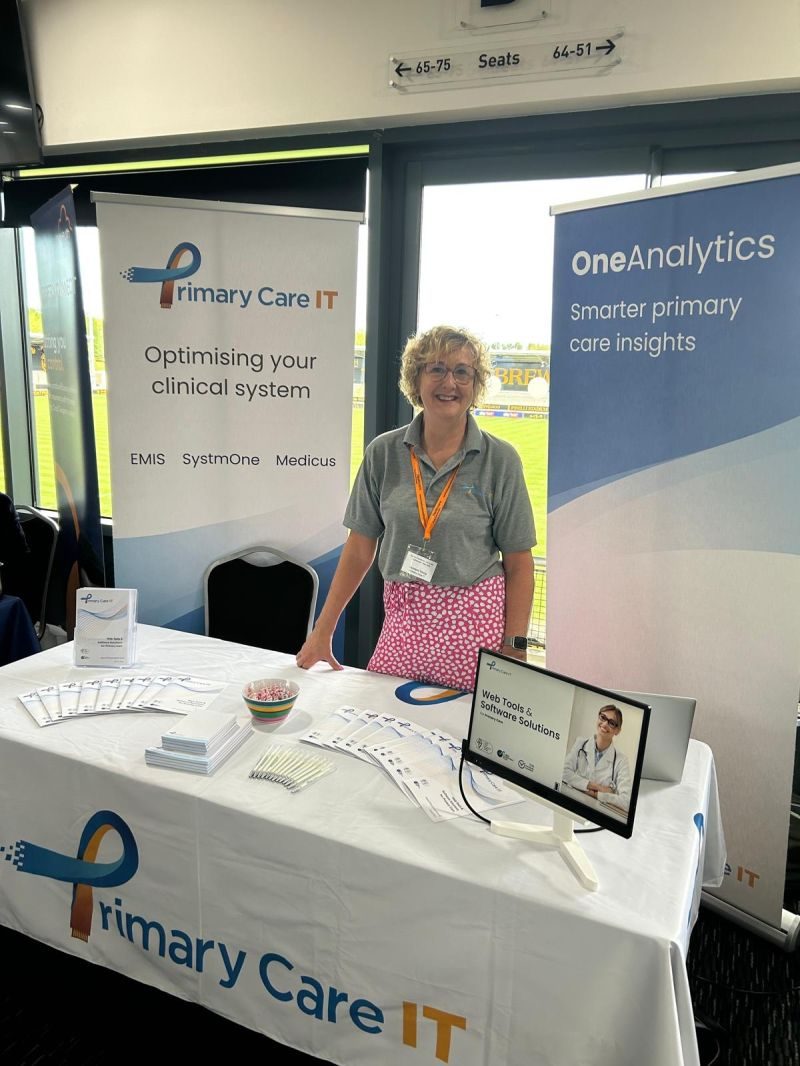
Last week we attended the Digital Transformation Leads Conference! Held at the Pirelli Stadium, Burton-Upon-Trent. Hosted by Howbeck Healthcare.
James & Vanessa from the team attended and spoke with both several DTLs & Practice Managers. We also held a break-out room discussion which highlighted the benefits of effective localisation.
Drawing on our experience supporting customers, we shared real-world case studies. These demonstrated how targeted changes to templates, workflows, and incorporation of intelligent alerts into clinical systems can support more proactive care and improve efficiency. By prompting users at the point of data entry, our alerts help ensure key requirements are met in real time, reducing the need for retrospective reconciliation, while also supporting improved performance and helping practices to secure the funding they are entitled to.
James & Vanessa from the team attended and spoke with both several DTLs & Practice Managers. We also held a break-out room discussion which highlighted the benefits of effective localisation.
Drawing on our experience supporting customers, we shared real-world case studies. These demonstrated how targeted changes to templates, workflows, and incorporation of intelligent alerts into clinical systems can support more proactive care and improve efficiency. By prompting users at the point of data entry, our alerts help ensure key requirements are met in real time, reducing the need for retrospective reconciliation, while also supporting improved performance and helping practices to secure the funding they are entitled to.
Resource Releases & Updates
📹 Updated QOF Tools (2026/27 – SystmOne)
Join us for a practical webinar introducing our updated QOF support tools for 2026/27, including the latest templates, protocols, and searches for TPP SystmOne designed to help practices get ahead this QOF year.
📅 Date & time: Thurs. 4th June 2026 at 13:00-13:45
🔴 The session will be recorded.
This session will cover:
🔵 updates to our QOF templates, protocols, and searches as part of our phase 1 release
🔵 how the revised resources can support practice workflows and delivery
🔵 key areas practices should prioritise early
🔵 how PCIT will continue supporting customers through phased resource releases and ongoing updates
Ideal for practice managers, QOF leads, PCN managers, recall/admin leads, and anyone involved in planning and delivering QOF.
📅 Date & time: Thurs. 4th June 2026 at 13:00-13:45
🔴 The session will be recorded.
This session will cover:
🔵 updates to our QOF templates, protocols, and searches as part of our phase 1 release
🔵 how the revised resources can support practice workflows and delivery
🔵 key areas practices should prioritise early
🔵 how PCIT will continue supporting customers through phased resource releases and ongoing updates
Ideal for practice managers, QOF leads, PCN managers, recall/admin leads, and anyone involved in planning and delivering QOF.
❓ CQRS Missed Vaccination Activity
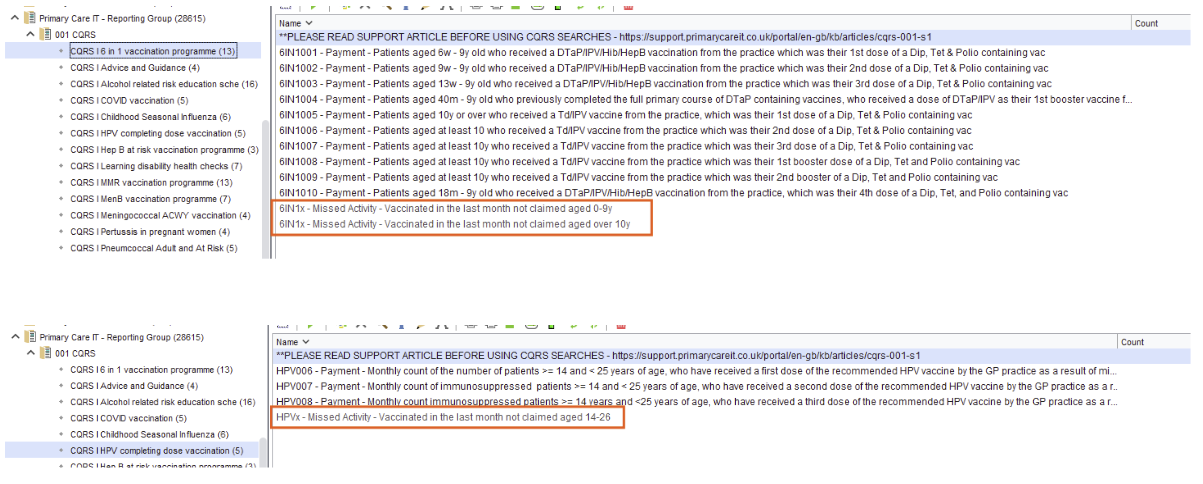
We have released a suite of CQRS Missed Activity searches. These enable users to identify activities that may have been missed. The data provide opportunities for learning and quality improvement. While it is not possible to correct cases where a vaccination has been given to an ineligible patient, the information can be used to support reflection and to develop preventive measures to reduce the risk of similar issues occurring in the future.
The screenshot shows examples of the Missed Activity searches located within the CQRS folder.
The screenshot shows examples of the Missed Activity searches located within the CQRS folder.
🩺 Recall QOF, IIF & Best Practice Searches
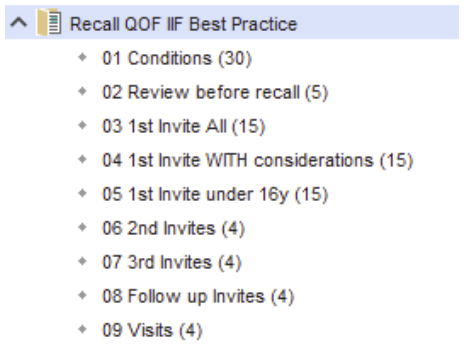
The QOF Recall searches are designed to help practices manage recalls for patients with long-term conditions. They identify patients for review in their birth month, helping to spread workload evenly throughout the year.
These searches are used alongside the PCIT Long Term Conditions template to record assessments and the PCIT Recall template to record whether an initial or complete assessment has been carried out, completing the recall workflow. The screenshot shows examples of the Missed Activity searches located within the PCIT Care IT – Reporting Group folder
These searches are used alongside the PCIT Long Term Conditions template to record assessments and the PCIT Recall template to record whether an initial or complete assessment has been carried out, completing the recall workflow. The screenshot shows examples of the Missed Activity searches located within the PCIT Care IT – Reporting Group folder
🫁 Asthma-COPD Overlap Syndrome (ACOS) Template
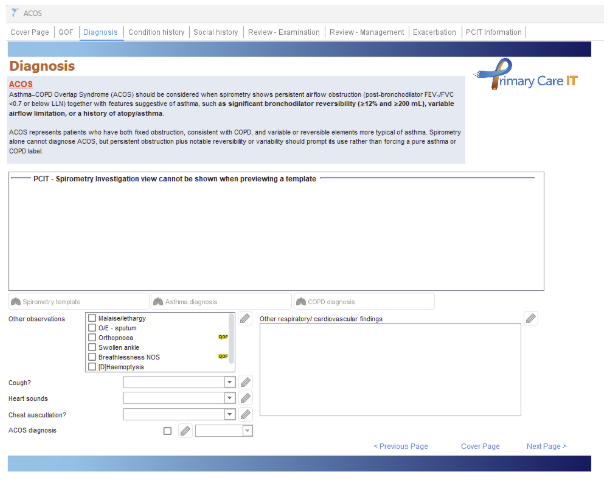
The Asthma-COPD Overlap Syndrome (ACOS) template supports the assessment and annual review of patients with features of both asthma and COPD. It combines key elements of asthma and COPD monitoring into a single template, helping clinicians record information consistently and efficiently.
The template includes QOF data entry, diagnostic support, clinical assessment, management review, and links to relevant resources and templates. Mandatory QOF fields are highlighted to help ensure activity is recorded accurately for payment and reporting purposes.
The template includes QOF data entry, diagnostic support, clinical assessment, management review, and links to relevant resources and templates. Mandatory QOF fields are highlighted to help ensure activity is recorded accurately for payment and reporting purposes.
FAQs, Training & more
Wanting to use our searches?
We have a full suite of searches available for practice use. You can find your current searches readily installed in your system by going to Clinical Reporting & opening the “Primary Care IT” folder.
How do I raise a support ticket?
If you ever need to contact us for support, the best way to reach us is by creating a support ticket, you can do this here. These tickets are triaged internally and passed to the relevant member of our team to ensure your request or question is answered to the best of our ability. You can always chase the progress of your support tickets by calling our office (0333 344 3678) and providing your ticket reference number.
We have a full suite of searches available for practice use. You can find your current searches readily installed in your system by going to Clinical Reporting & opening the “Primary Care IT” folder.
How do I raise a support ticket?
If you ever need to contact us for support, the best way to reach us is by creating a support ticket, you can do this here. These tickets are triaged internally and passed to the relevant member of our team to ensure your request or question is answered to the best of our ability. You can always chase the progress of your support tickets by calling our office (0333 344 3678) and providing your ticket reference number.