
February 2026 – EMIS Newsletter
Topics
A message from our team
Hello!
Welcome to our 2nd newsletter of 2026! As a reminder, during Q4 for our OneAnalytics users that we will be doing additional data extractions over February & March. For full details of our data extractions (including targeted dates), see our schedule: OneAnalytics Extract Schedule.
In the final QOF push, don’t forget to watch our “Wondering about QOF at this time of the year?” webinar here. We have also been sending out QOF hint & tip articles, full details below!
Best Wishes,
James (Customer Experience Manager)
Welcome to our 2nd newsletter of 2026! As a reminder, during Q4 for our OneAnalytics users that we will be doing additional data extractions over February & March. For full details of our data extractions (including targeted dates), see our schedule: OneAnalytics Extract Schedule.
In the final QOF push, don’t forget to watch our “Wondering about QOF at this time of the year?” webinar here. We have also been sending out QOF hint & tip articles, full details below!
Best Wishes,
James (Customer Experience Manager)
PCIT Updates
✏️ End of year hints and tips!
Back in January we started sending out a series of hint & tip guides to achieving QOF points in Q4. If you missed the first 5 in this series, you can access them below:
🔵 Planning to Maximise your QOF Potential in Q4
🔵 Using our Searches to Maximise QOF Potential in Q4
🔵 Achieving BP Indicators
🔵 QOF Indicators Requiring Blood Tests
🔵 Achieving Time Sensitive Indicators
Make sure you are registered on our website to receive these moving forward if you haven’t already!
🔵 Planning to Maximise your QOF Potential in Q4
🔵 Using our Searches to Maximise QOF Potential in Q4
🔵 Achieving BP Indicators
🔵 QOF Indicators Requiring Blood Tests
🔵 Achieving Time Sensitive Indicators
Make sure you are registered on our website to receive these moving forward if you haven’t already!
🎥 Wondering about QOF at this time of the year?
Thank you to everyone who joined us for our webinar back in January. For our existing customers, this was a refresh of our GP Contract Pro tools, particularly focusing on actions to tidy up QOF at this time of the year.
This webinar showed PCIT resources but is suitable for both customers & non-customers utilising either EMIS Web or TPP SystmOne. The support article will allow you to download the slides, spreadsheet shown during the webinar and QOF coding sheet.
This webinar showed PCIT resources but is suitable for both customers & non-customers utilising either EMIS Web or TPP SystmOne. The support article will allow you to download the slides, spreadsheet shown during the webinar and QOF coding sheet.
Resource Releases & Updates
🐝 Covid Spring Booster vaccination programme – Update
The Covid Spring Booster 2026 programme is due to start on 13th April 2026. PCIT is reviewing information and resources in advance of this programme start date.
For EMIS customers there is a significant change with the administration and payment claims elements moving from Pinnacle to EMIS web and PCIT are aware of this and plan to provide additional resources to support this once business rules and technical guidance are released by NHSE.
For EMIS customers there is a significant change with the administration and payment claims elements moving from Pinnacle to EMIS web and PCIT are aware of this and plan to provide additional resources to support this once business rules and technical guidance are released by NHSE.
🦠 Respiratory Syncytial Virus (RSV) vaccination programme – Update
The RSV programme will be expanded on 1st April 2026 to include all adults aged 80 and above, and anyone living in an older adults care home.
PCIT is currently reviewing information as it made available and resources will be updated ready for the programme start date.
PCIT is currently reviewing information as it made available and resources will be updated ready for the programme start date.
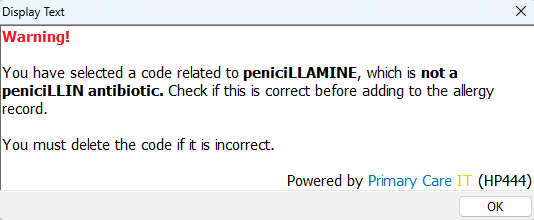
🩺 Penicillamine Allergy Prompt (HP444)
We are proud to release resources to assist with the National Patient Safety Alert regarding harm from recording a peniciLLIN allergy as a peniciLLAMINE allergy. There is a suite of searches for EMIS Web and a separate protocol.
National Patient Safety Alert: NHS England » National patient safety alert – harm from incorrect recording of a penicillin allergy as a penicillamine allergy
📚 For our support guides, see below:
🔵 EMIS Web Searches
🔵 EMIS Web Protocol
National Patient Safety Alert: NHS England » National patient safety alert – harm from incorrect recording of a penicillin allergy as a penicillamine allergy
📚 For our support guides, see below:
🔵 EMIS Web Searches
🔵 EMIS Web Protocol
🧒🏼 MMRV and VI002 – 1st MMR dose given aged 12-18 months
The MMRV codes being used for the new vaccine have not been added to the business rules for this indicator (v50) and any update to these rules is unlikely at this point in the QOF year. For the majority of patients this should not be a problem as the indicator looks at children born between 01/10/2023 and 30/09/2024 who have turned 18 months during the QOF year, and should have already received an MMR vaccine. The youngest children to be affected would have turned 12 months by 30/09/2025 so most of these would have received their 12 month vaccinations by 31/12/2025. However, if their 12 month vaccinations were delayed by more than 3 months they may have received the MMRV vaccine instead of MMR.
This would be correct according to the childhood immunisation schedule but the MMRV dose not been accounted for within the QOF business rules. Children born between 01/07/2024 and 30/09/2024 who have been given their 12 month vaccinations in 2026 before turning 18 months will be excluded from the VI002 achievement even though they were vaccinated in the correct timeframe and according to the national schedule.
Practices encountering this situation should not use the old MMR codes simply to achieve the QOF indicator. At the moment there is no solution for this unless the business rules get updated before 31/03/2026. If practices are affected we would recommend raising this as a dispute with your QOF achievement and speaking to commissioners to highlight potential missing income.
Coding the new MMRV vaccination
Following queries from several customers please note that care must be taken when coding an MMRV vaccination. Guidance circulated in December advised the following 2 codes should be used for MMRV:
432636005 – Administration of measles and mumps and rubella and varicella virus vaccine
433733003 – Administration of second dose of measles and mumps and rubella and varicella virus vaccine
This means the following should be used:
🔵 1st dose MMRV (no previous MMR) – 432636005
🔵 1st dose MMRV (already had 1 dose of MMR) – 432636005 (not the 2nd MMRV dose code)
🔵 2nd dose MMRV – 433733003
Using the correct code should avoid issues with the EMIS Web pink box alert showing incomplete vaccinations for these children.
Some children will eventually receive 3 doses of an MMR containing vaccine as they had MMR at 12 months, followed by MMR at 40 months (older children) or MMRV at 18 months (born July-December 2024), and will be offered another dose of MMRV in the catch-up campaign starting in Nov 2026.
This would be correct according to the childhood immunisation schedule but the MMRV dose not been accounted for within the QOF business rules. Children born between 01/07/2024 and 30/09/2024 who have been given their 12 month vaccinations in 2026 before turning 18 months will be excluded from the VI002 achievement even though they were vaccinated in the correct timeframe and according to the national schedule.
Practices encountering this situation should not use the old MMR codes simply to achieve the QOF indicator. At the moment there is no solution for this unless the business rules get updated before 31/03/2026. If practices are affected we would recommend raising this as a dispute with your QOF achievement and speaking to commissioners to highlight potential missing income.
Coding the new MMRV vaccination
Following queries from several customers please note that care must be taken when coding an MMRV vaccination. Guidance circulated in December advised the following 2 codes should be used for MMRV:
432636005 – Administration of measles and mumps and rubella and varicella virus vaccine
433733003 – Administration of second dose of measles and mumps and rubella and varicella virus vaccine
This means the following should be used:
🔵 1st dose MMRV (no previous MMR) – 432636005
🔵 1st dose MMRV (already had 1 dose of MMR) – 432636005 (not the 2nd MMRV dose code)
🔵 2nd dose MMRV – 433733003
Using the correct code should avoid issues with the EMIS Web pink box alert showing incomplete vaccinations for these children.
Some children will eventually receive 3 doses of an MMR containing vaccine as they had MMR at 12 months, followed by MMR at 40 months (older children) or MMRV at 18 months (born July-December 2024), and will be offered another dose of MMRV in the catch-up campaign starting in Nov 2026.
💉 PPV/PCV – change to older adults and at risk patients specification
PCV20 became available for practices to order in January so PCIT have reviewed and updated all resources to reflect the move away from PPV to PCV20. Some patients should still be given PPV while stocks last while other patients should be given the PCV20 vaccine regardless of PPV stock levels so we would recommend checking the guidance documents to ensure the correct vaccine is being used. Pneumococcal vaccination programmes for infants, adults and individuals at increased clinical risk – GOV.UK
The code ‘Pneumococcal vaccination given’ applies to both PCV and PPV vaccines so customers can continue to use this code which is used in our templates and searches.
For children in the high risk category who may be given the PCV20 in place of the PCV13 for their routine childhood doses, please note that there is no need to change codes for this.
As the codes are generic, we would recommend noting which vaccine has been used in the text field attached to the vaccination code on the template (this will allow for the information to be shown in a report if necessary). You may also be prompted to add an appropriate product code (medication) by EMIS Web – please note that this is a not a PCIT protocol so any queries about that should go to Optum.
The code ‘Pneumococcal vaccination given’ applies to both PCV and PPV vaccines so customers can continue to use this code which is used in our templates and searches.
For children in the high risk category who may be given the PCV20 in place of the PCV13 for their routine childhood doses, please note that there is no need to change codes for this.
As the codes are generic, we would recommend noting which vaccine has been used in the text field attached to the vaccination code on the template (this will allow for the information to be shown in a report if necessary). You may also be prompted to add an appropriate product code (medication) by EMIS Web – please note that this is a not a PCIT protocol so any queries about that should go to Optum.
💬 Last Text Message (HP055)
Our HP055 will soon become a base resource rather than optional and will be found on all admin launchers. This handy protocol is designed for admin staff to use quickly to check the content of the most recent text messages documented on the record.
This handy protocol is dependent on sent messages being coded in the Care Record either manually or written back via a third-party application. Appointment reminders may be displayed if one of the codes listed in this article is configured to record the message on the Care Record.
📚 For further details, see our support guide below:
🔵 Last Text Message Sent (HP055)
This handy protocol is dependent on sent messages being coded in the Care Record either manually or written back via a third-party application. Appointment reminders may be displayed if one of the codes listed in this article is configured to record the message on the Care Record.
📚 For further details, see our support guide below:
🔵 Last Text Message Sent (HP055)
🔍 February Search Rollout
This month we’re rolling out changes to 2 of our folders, those folders are as follows:
🔵 001 CQRS
🔵 009 MHRA, NPSA, CAS and other searches
For full details, please see our search change log.
🔵 001 CQRS
🔵 009 MHRA, NPSA, CAS and other searches
For full details, please see our search change log.
📊 New OneAnalytics Platform
We have launched our new OneAnalytics portal! What’s new: A modern user interface with improved performance and usability, stronger Security though Two-Factor Authentication (2FA) and Local access management for faster updates and improved control.
As part of the launch of the new platform, your organisation will now manage its own user access directly. You should have now been contacted if you have been identified as the designated Organisation Administrator for this platform.
Two-Factor Authentication (2FA) will now be enforced for all users. Please note: Generic logins are no longer supported.
If your contract includes OneAnalytics but you are yet to be contacted, this means we’re finalising discussions with your area to ensure IG materials (i.e. DPA/DPIAs) are updated and accurate to cover additional functionality added.
For further details and support on using the platform, please see our Knowledge Base. Reminder for Analytics customers that we complete 2 extractions in February and march and checking OneAnalytics Extract Schedule for when the extracts have been updated as well as through the portal.
As part of the launch of the new platform, your organisation will now manage its own user access directly. You should have now been contacted if you have been identified as the designated Organisation Administrator for this platform.
Two-Factor Authentication (2FA) will now be enforced for all users. Please note: Generic logins are no longer supported.
If your contract includes OneAnalytics but you are yet to be contacted, this means we’re finalising discussions with your area to ensure IG materials (i.e. DPA/DPIAs) are updated and accurate to cover additional functionality added.
For further details and support on using the platform, please see our Knowledge Base. Reminder for Analytics customers that we complete 2 extractions in February and march and checking OneAnalytics Extract Schedule for when the extracts have been updated as well as through the portal.
FAQs, Training & more
Wanting to use our searches?
We have a full suite of searches available for practice use. You can find your current searches readily installed in your system by going to Population Reporting & opening the “! Primary Care IT” folder.
It’s important to note we go into practice systems and update these as frequently as possible. For further information on our searches, click here. See our guide to know the latest changes to our searches here.
Queries about CQC Navigator?
CQC inspection teams use a set of searches which have been designed to help them to understand how a Practice manages their patient population, and to identify clinical situations which should not be happening. To support with this, Primary Care IT has adapted these searches to help practices understand what might need to be addressed before a CQC inspector finds it.
We recommend checking our CQC Navigator FAQ guide here. If you have any questions after reading the article, please raise a ticket with us for support.
How do I raise a support ticket?
If you ever need to contact us for support, the best way to reach us is by creating a support ticket, you can do this here. These tickets are triaged internally and passed to the relevant member of our team to ensure your request or question is answered to the best of our ability. You can always chase the progress of your support tickets by calling our office (0333 344 3678) and providing your ticket reference number.
We have a full suite of searches available for practice use. You can find your current searches readily installed in your system by going to Population Reporting & opening the “! Primary Care IT” folder.
It’s important to note we go into practice systems and update these as frequently as possible. For further information on our searches, click here. See our guide to know the latest changes to our searches here.
Queries about CQC Navigator?
CQC inspection teams use a set of searches which have been designed to help them to understand how a Practice manages their patient population, and to identify clinical situations which should not be happening. To support with this, Primary Care IT has adapted these searches to help practices understand what might need to be addressed before a CQC inspector finds it.
We recommend checking our CQC Navigator FAQ guide here. If you have any questions after reading the article, please raise a ticket with us for support.
How do I raise a support ticket?
If you ever need to contact us for support, the best way to reach us is by creating a support ticket, you can do this here. These tickets are triaged internally and passed to the relevant member of our team to ensure your request or question is answered to the best of our ability. You can always chase the progress of your support tickets by calling our office (0333 344 3678) and providing your ticket reference number.