
QOF Indicators Requiring Blood Tests
Introduction
Several QOF indicators require patients to have a blood test during the QOF year and some also require the results to be within a specific target. These indicators can be difficult to achieve depending on phlebotomy capacity, especially as some may require more than one test per patient during the year.
In Q4 it is important to review these indicators while there is still time to schedule patients for tests so ideally all patients on these indicators will have had 2 invites by the end of February at the latest.
Indicators:
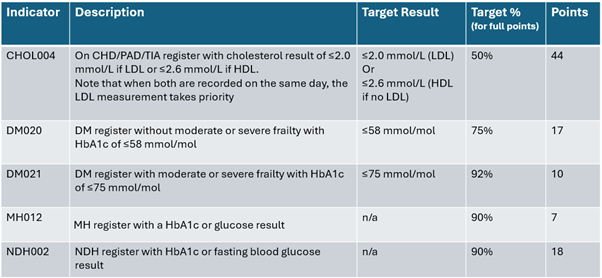
CHOL004 – latest cholesterol needs a result of ≤2.0 mmol/L for LDL or ≤2.6 mmol/L for HDL. Note that if both LDL and HDL are recorded on same day, the LDL result will be the priority.
More details: CHOL004 – LDL cholesterol less than or equal to 2.0
CHOL004 is worth 44 points in 2025/26 – almost £10,000 to an average sized practice
DM020 – latest HbA1c of ≤58 mmol/mol. Only for patients who do not have a code of moderate or severe frailty.
More details: DM020 – Diabetes (without frailty) with HbA1c less than or equal to 58
DM021 – latest HbA1c of ≤75 mmol/mol. Note only applies to patients with a code of moderate or severe frailty.
More details: DM021 – Diabetes (frail) with HbA1c less than or equal to 75
MH012 – just needs a HbA1c or blood glucose result
More details: MH012 – HbA1c for SMI
NHD002 – just needs a HbA1c or fasting blood glucose result
More details: NDH002 – HbA1c monitoring
Key areas to consider
· Coordinate the team
· Combine tests
· Have a clear practice protocol for adding tests to a request
· Ensure all staff are aware of OneMonitoring and OneResults in the pink box
Blood tests can be easy to request but end up involving a significant amount of staff and patient time especially if they are not coordinated and patient ends up called back several times for different tests in a short period. This can impact on patient cooperation especially in cohorts who may find it difficult to attend for blood test appointments or who struggle to engage with health services.
Practices should consider having clear blood test requesting protocols especially if tests requests are created by non-clinical staff following a protocol for a specific indicator or medication. If the person placing the request is just looking at the CHOL004 indicator they may not be aware that patient also needs a HbA1c or tests relating to medication.
If requests are sent out by different members of the non-clinical team, consider providing a clear protocol for recognising additional tests to add to a request. This may apply to admin staff sending out QOF recalls or admin/prescription staff sending out routine blood test monitoring for medication.
PCIT has alerts in the pink box designed to support staff with ensuring that key QOF related blood tests are included if requesting bloods. These alerts also support with medication monitoring so staff may need a guide to which bloods to include on any request and which need to be checked with an appropriate clinician first.
Know The Targets
For CHOL004, DM020 and DM021 it is essential clinicians in the team are all aware of the targets for these indicators. Often when blood test results are received they are dealt with within the test results workflow and the clinician may assess results as clinically unremarkable or requiring no action when the patient is just outside the QOF indicator target.
CHOL004 is a particularly important one as it is a relatively new QOF indicator, and patients may not be seen for a review following their blood test if the clinician reviewing those results assesses them as no action required. The upper indicator target for CHOL004 is 50% this year, a significant increase from 24/25 and most practices will have a high number of eligible patients which means hitting the target for 50% of those patients is likely to be demanding. Note that PCAs were also added for 25/26 which may help practices reach their targets.
For DM020 and DM021 a key element is frailty coding as the HbA1c target for patients with a frailty code of moderate or severe frailty will move from ≤58 mmol/mol in DM020 to ≤75 mmol/mol in DM021.
It is useful for all clinicians to be aware of the different targets for patients with and without moderate or severe frailty. If there are concerns about risks of overtreatment in a patient who may be frail then assessing and coding that frailty helps to ensure they fall into the correct target group for QOF.
Identify outstanding patients
In Q4 it is essential to have a targeted approach especially for indicators requiring blood results within a specific range.
For MH012 and NDH002 where the requirement is simply to have a test done, the main priority will be to ensure that all patients have had at least 2 invites with the appropriate invite code at least 7 days apart. This will ensure that these patients will not adversely affect the practice achievement if they do not have the test done by end of year.
Check 004B / Indicator Navigator searches for the appropriate indicator for reports showing any patients who have only received one invitation and need a second invitation to ensure maximum achievement.
For CHOL004, DM020 and DM021 it may be useful to identify specific groups of patients. The 004B / Indicator Navigator has a number of searches to support this.
Look out for
· Patients who have only had one invitation this year
· Patients who have not had a result coded at all this year
· Patients who have not met the target and have previously had a PCA
· Quick Win searches
Remember – reports can be exported into Excel and sorted or filtered. They have been designed to offer key information at a glance to help avoid the need to go in and out of patient records to identify work to do.
Consider Quick Wins
In Q4 it is important to consider what is still achievable before the 31st March. Quick Wins are all about identifying those outstanding patients who have the potential to add to the practice’s achievement or who can be removed from the denominator with an appropriate PCA.
CHOL004 – there are two Quick Win reports in the Indicator Navigator / Cholesterol folder for patients who have not had a cholesterol test this year, but who had one in the previous QOF year which was within the target range. One report identifies patients who are on lipid lowering therapy and the other is for patients who are not currently on a lipid lowering therapy. These can be useful cohorts for one final push.
Practices may also want to look at borderline patients – see 004B / j.CV Focus for INTENSIFY | Cholesterol LDL this year borderline which provides patients who have had a LDL cholesterol in the last 12 months which was marginally above the indicator threshold. This report can be filtered and sorted in different ways for clinicians who wish to recall or review patients in this cohort.
Consider PCAs
Understanding and applying PCAs appropriately can often be the difference between practices achieving maximum QOF points for an indicator, and failing to get those last few points.
PCAs include:
o 2 invites sent with no response
o Maximum tolerated therapy
o Informed dissent
o Clinically unsuitable
Invitation PCAs – it is always important to ensure that QOF related invitations are appropriately coded. As long as a patient has had 2 invites (using an appropriate code) during the QOF year and added at least 7 days apart there is no need to manually add a PCA. The 2 invites will automatically be applied as a PCA.
For MH012 and NDH002 make sure that all outstanding patients have had 2 invites and that the invites are appropriately coded. The 004B Indicator Navigator folders for Mental Health and NDH both include searches for any patients outstanding who have only had 1 invitation so sending a 2nd invitation to these patients can be a useful quick win.
HOWEVER – for CHOL004, DM020 and DM021 – indicators with a blood test result target it is important to be aware that a patient who responds after 2 invites and has a result that is above the indicator target will not have the 2 invite PCA applied unless they have ANOTHER 2 invites following that result.
When sending invitations it is important not to keep sending invitations to all outstanding patients. This risks sending unnecessary invitations to patients who have just had bloods done or who have been advised by a clinician that there is no need to repeat bloods at this time and can lead to increased SMS costs and patient complaints.
Instead use the PCIT searches in the 004B Indicator Navigator and 004B j CV Focus folders to ensure invitations go out to appropriate cohorts based on your planned targeted approach.
Maximum tolerated therapy PCAs
TOP TIP – Make sure all clinicians are aware of codes for max tolerated therapy and what they mean for QOF.
The easiest way to use these codes is via the PCIT OneTemplate Prescriber or OneTemplate NonPrescriber as both of these templates have the max tolerated codes on the Contracts Outstanding page and on the relevant disease page.
The max tolerated therapy codes are expiring PCAs so they do need to be reviewed and reapplied each year if still appropriate.
For CHOL004, DM020 and DM021 check out the PCA CHECK searches in the relevant Indicator Navigator folder. These will identify patients who have not met the target this year for that indicator but who have previously had a PCA applied in the last 3 years. This report can be sorted and filtered to identify patients who may have previously been coded with an appropriate max tolerated therapy code and a clinical review of these patients may be useful.
Due to a change to SNOMED codes for max tolerated therapy in late 2025, new codes are available to select in a consultation, while the old codes may still be found on templates. Both old and new codes are in the current QOF business rules so there should not be any need to change codes that have already been added this QOF year. To avoid any confusion, we recommend using the codes within the appropriate PCIT template.
Final Tips
Remember:
· Have a clear plan
· Know the targets
· Identify outstanding patients
· Consider quick wins
· Consider PCAs
· Decide which cohorts to target
Check out the PCIT support articles for detailed support for each indicator and a full list of useful code
📹 Thank you to everyone who joined us for our “Wondering about QOF at this time of year?” webinar. For customers, this was a refresh of our GP Contract Pro tools, particularly focusing on actions to tidy up QOF at this time of the year.
This webinar showed PCIT resources but is suitable for both customers & non-customers utilising either EMIS Web or TPP SystmOne.
🌐 Watch here: Wondering about QOF at this time of year? on Vimeo